Science & AI: Stop Asking Which AI Is Smartest. Ask Which One Is Allowed to Touch Your Data.
There are four flavors of Claude, which one is the right for which job?
Recently in a team meeting I talked about modelling results built with Claude Code and then one of my colleagues asked: Which flavor of Claude should be used for what?
There are now four options to use Claude Opus.
Plain Claude Chat in the browser (“old school”).
Claude Cowork, which runs directly on your computer and takes on a whole project.
Claude Code, which also runs locally, but is focussed on coding.
And we have “Ernie”, our agentic-AI team member, that runs 24/7 on a Mac Mini in my basement using OpenClaw.
What differentiates them? A ladder of intelligence? Maybe just "how much coding is involved"?
That is the wrong mental model, and getting it wrong is exactly how you end up letting a language model eyeball your hard-won measurement data and hand you back a number you can't reproduce.
So I built a cheat sheet. And the more I worked on it, the more I realised the axis that actually matters for a scientist is not smart vs. dumb or code vs. no-code. It is this: who is allowed to touch your precious data, and is the result reproducible?
Let me walk you through it.
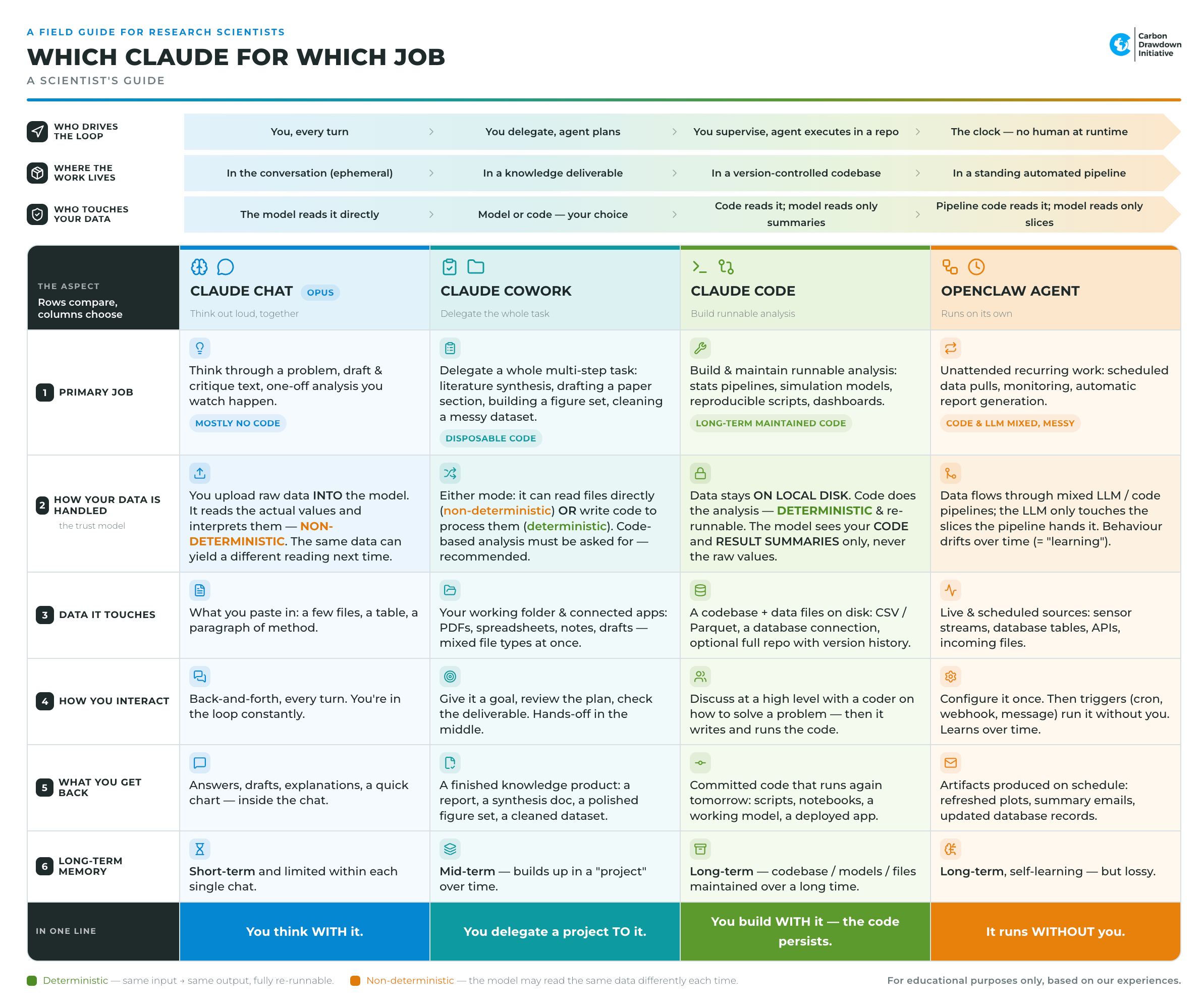
1. Claude Chat: you think with it
This is the one everybody knows as started by ChatGPT. You open a chat in your browser, you paste something in, you go back and forth. You are in the loop on every single turn, no progress without you.
It is brilliant for thinking through a problem, a quick translation, drafting and then tearing apart a piece of text, or a quick one-off analysis you watch happen in front of you. I personally use this AI-option less and less while moving to the more context-stable other options (“new school”).
But here is the part scientists need to internalise: when you upload a data file into a chat, you send it to the cloud, the model reads the actual values and interprets them. It is looking at your numbers and telling you what it thinks they mean. That process is non-deterministic: There is a hard-coded randomizing element built into LLMs and this can’t be worked around. Drift happens because AI labs actively retrain, patch, and update the models behind the scenes. Ask the same question tomorrow and you may get a different reading. For brainstorming, fine. For "what is the mean CO₂ flux in treatment group B," that is not how I want my science done. The model is a marvellous interpreter and a terrible calculator-of-record.
Memory here is short: it lives and dies inside the single chat.
2. Claude Cowork: you delegate a project to it
Cowork is where you stop driving every turn. You hand over a goal - "synthesise these 40 papers," "draft the methods section," "build me a clean figure set," "untangle this messy dataset" - and it makes a plan, works across your folder and connected apps (PDFs, spreadsheets, notes, drafts, all at once), and comes back with a finished knowledge product. You review the plan, you check the deliverable, and you are mostly hands-off in the middle.
You give it your data by compiling files (CSVs, XLS, PDFs, etc.) that describe your project into a folder on your disk. The “what happens to the data?” question gets interesting here, because Cowork can work either way. It can read your files directly (non-deterministic, same caveat as Chat), or it can write code to process them properly (locally on your computer). The crucial bit: if the numbers matter, you have to explicitly ask it to compute, not eyeball. I now say this out loud in almost every Cowork session - "do this in code, show me the script." It is a habit worth building.
Memory is mid-term: it builds up inside a "project" over time, which is exactly what you want for a multi-week paper.
3. Claude Code: you build with it, and the code persists
This is the one I trust with the real measurements, and the reason is the single most important box on the whole cheat sheet:
Again you give it a folder with the necessary data on your hard drive. Your data stays local and is processed locally. The code does the analysis. The model sees your code and your result summaries at best, but it never reads the raw values. Your data isn’t uploaded to the cloud.
Think about what that buys you. The analysis is deterministic and re-runnable. Run it today, run it in a year, get the identical answer. When a reviewer asks "how did you get this p-value," the answer is a script, not a vibe.
People hear "deterministic" and assume the non-determinism magically disappeared. It did not - it moved. The model still writes the analysis stochastically; it might phrase the same statistical test three different ways on three different days. But that stochastic step is now sitting in front of you as readable code that you review and freeze. The randomness moved out of "interpreting my data" and into "drafting my method" - where it belongs, because that is the part a scientist is supposed to check anyway.
You interact at a high level - you discuss how to solve the problem with a very capable coder, and then it does research if necessary, writes and runs the code. What you get back is committed code that runs again tomorrow: pipelines, notebooks, a working model, a deployed dashboard. Memory is genuinely long-term, because your codebase, models and files are maintained over months.
Don’t get scared by the work “code”: The great thing is that you do not need to know how to program to work successfully with Claude Code (but it sure helps a lot).
4. OpenClaw agent: it runs without you
The fourth one is a different animal entirely, and regular readers know I have written about my OpenClaw adventures before. You configure it once, and then triggers - a cron schedule, a webhook, a Telegram message - run it without you. It pulls from live and scheduled sources: sensor streams, database tables, APIs, incoming files. Out comes a steady drip of artifacts on schedule: refreshed plots, summary emails, updated database records.
For a scientist this is the "watch my experiment for me" tool. Every morning at 06:00, scan the sensor data, flag anomalies, plot the trend, email it to the team.
The trade-off is real and I will not sugar-coat it, because I have the scars: an agent flows your data through a mixed LLM-and-code pipeline, and its behaviour drifts over time - what we politely call "learning." Its long-term memory is long but lossy. It is a workhorse, but a high-maintenance one that needs herding. (My evangelist agent once posted five replies to the same post instead of one reply to five posts. Charming. Not what I asked for.) Use it for the recurring, the unattended, the "I don't want to think about this every day" - but not for the analysis you are going to publish. BTW, this option creates the by far highest cost for tokens, our shared OpenClaw agent burns through ca. 1000 Euro in tokens each month, this is down from 8000 Euro/month after I talked it into running a lot of recurring tasks in Python code instead of using LLMs prompts.
The one row that matters most
If you take nothing else from the cheat sheet, take the "How your data is handled" row. It maps cleanly onto a spectrum every scientist already understands intuitively:
Chat: The model reads it directly
Cowork: model or code, your choice
Code: code reads it, model reads only summaries
OpenClaw: pipeline code reads it, model reads only slices.
From top to bottom, you get more automation. Chat is the most fluid and the least auditable. Code is the most rigid and the most trustworthy. There is no "best" - there is only "right for this task."
This is still early: but the map already helps
None of these tools is finished. They overlap at the edges (Chat can now run code too, which smudges the left column), they change every few weeks, and they will all be different by the time you read this. But the underlying axes - who drives the loop, where the work lives, who touches your data, how long it remembers - those are stable, and they are what the cheat sheet is really about.